Analyze PDFs
before opening them.
Received a PDF by email and not sure if it's safe? SafePDF Checker tells you in under a second if it hides JavaScript, executables, or malicious links — without opening it, without executing anything, without uploading your file.
Version v1.2.0 · April 2026 · Microsoft verified download
Three steps to know if your PDF is safe
Drag, analyze, decide. No hassle.
Drag or open the PDF
Drag the file to the window, click Open, or use the Windows context menu (right-click).
Instant analysis
The 3-layer engine examines 40+ risk indicators in under one second. No internet needed.
▸ Behavior ✓
▸ Links ✓
Clear verdict
Clean, Caution, Danger, or Encrypted. A panel explains each finding in plain language.
No risk indicators found
3-layer analysis engine
The same analysis cybersecurity professionals use, with an interface anyone can understand.
Advanced structural analysis
Embedded JavaScript, automatic actions (/OpenAction, /AA, /Launch), hidden executables (MZ/ELF/MachO), anomalous compression, JS obfuscation (12 patterns), known exploits, decompression bombs.
Behavior analysis
Directed graph analysis with reachability. Distinguishes whether code runs automatically when opening the PDF or just validates forms. 7 malicious patterns, 7 decision rules.
Malicious links & QR codes
Suspicious URLs: direct IPs, shorteners, .exe downloads, open redirects. QR codes with hidden redirects. 254 trusted domains + your custom domains.
Everything you need to analyze with confidence
Native Fluent 2 design. Clean, fast, powerful interface.
🛡️ Analysis & security
VirusTotal (optional)
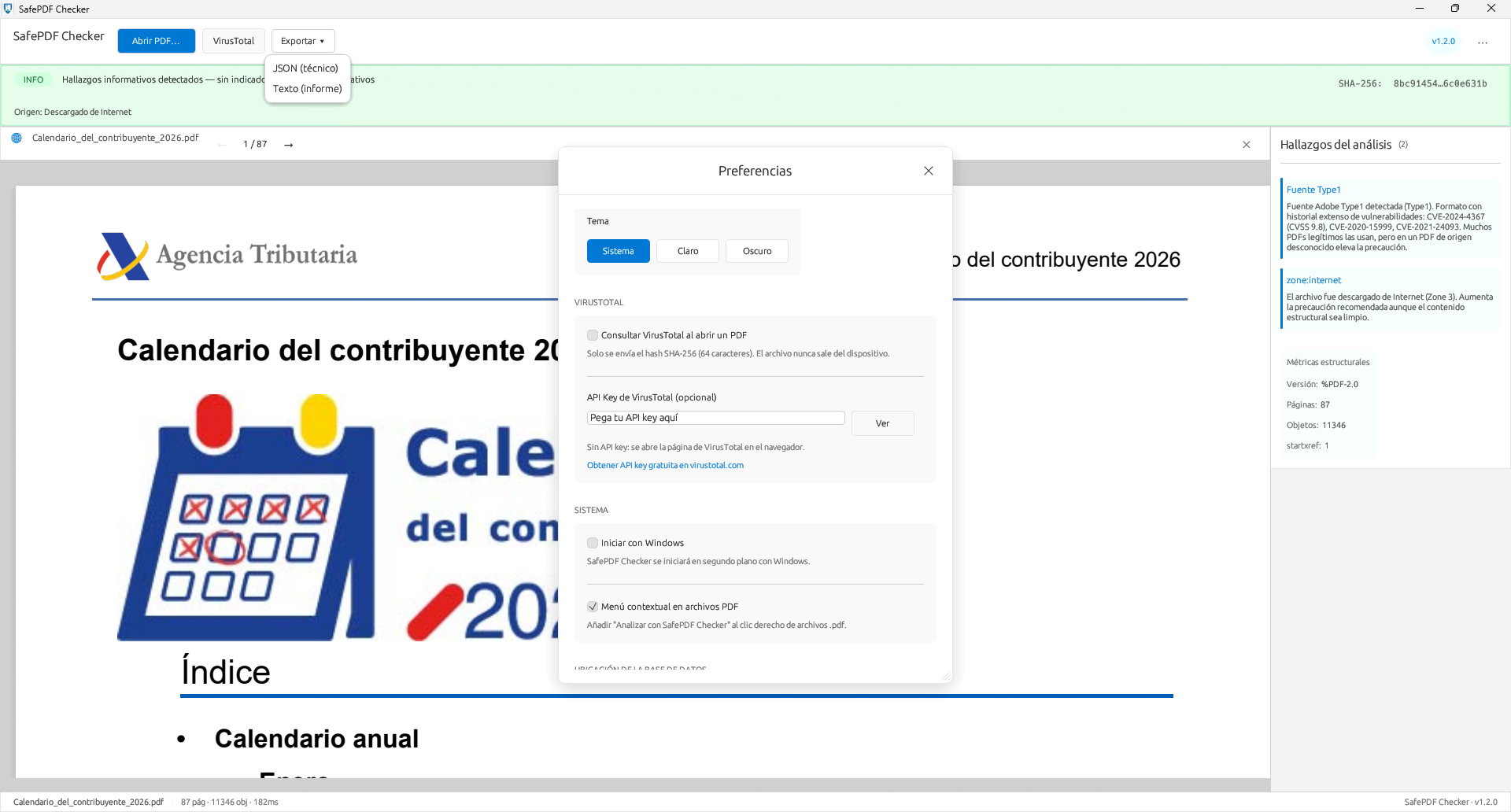
Query by SHA-256 hash. Only the fingerprint — the file is never sent. API key encrypted with Windows DPAPI.
Secure preview
Google Chrome's PDFium compiled without JavaScript. Renders text, images, and tables — but cannot execute document code.
Encrypted PDFs
Detects protected documents, prompts for password. Full analysis after decryption.
QR codes
Detects and decodes embedded QR codes. Analyzes destination URLs with the same link engine.
🔒 Privacy & control
Custom domains New
Add trusted or blocked domains with local SQLite. CSV import/export to share between computers.
Export reports New
Technical JSON or readable text report. Ideal for attaching to documentation.
Light & dark theme
Adapts to your Windows settings or force light/dark from Preferences.
⚙️ Integration & performance
Context menu New
Right-click any .pdf in Windows File Explorer. Analyze directly without opening the app first.
Performance
Analysis in under 1 second. Byte caching: the PDF is read from disk only once.
Real privacy, not promises
Your file never leaves your computer. No exceptions.
No servers
All analysis is local. Not a single byte of the PDF is sent to the internet.
No telemetry
We don't track which files you analyze. No analytics, no cookies, no tracking.
DPAPI encrypted
If you use VirusTotal, your API key is encrypted with Windows DPAPI. Only your account can decrypt it.
DLL verification
pdfium.dll is verified by SHA-256 hash on load. If it doesn't match, it won't load.
Built with serious technology
Frequently asked questions
General
Yes. It analyzes the PDF structure without opening it or executing its content. The preview uses PDFium (from Google Chrome) compiled without a JavaScript engine — it can render pages but is physically incapable of executing code. All analysis is local.
No. All analysis is performed on your device. The VirusTotal query is optional and only sends the SHA-256 hash (64 characters), never the file. It requires your explicit consent.
Yes, 100% free with all features. There's an optional 4.99 EUR donation to support development — it doesn't unlock anything. Donors receive a "♥ Supporter" badge.
Technical
Over 40 indicators: embedded JavaScript (12 obfuscation patterns), automatic actions, hidden executables by magic bytes, suspicious compression, decompression bombs, malicious QR codes, CVE exploits. Directed graph analysis distinguishes auto-executable code from legitimate forms.
Yes. It detects protected documents and prompts for the password. After decryption, full analysis and preview. Without password, partial analysis of the visible structure.
Yes, since v1.2. Add trusted or blocked domains with a local SQLite database. CSV import/export to share between computers. Built-in anti-spoofing validation.
Yes. Technical JSON (for scripts and integration) or readable text report (for email or documentation). Includes verdict, findings, metrics, and SHA-256 hash.
Start analyzing PDFs today
Available on Microsoft Store for Windows 10 and 11 (64-bit and ARM64).